Review and revision workflow
Pi Sych can separate independent review, accepted revisions, and final verification into fresh worker processes. This is a recommended workflow pattern rather than a runtime-enforced pipeline. The README’s introductory overview is a simpler orientation; this diagram shows the fuller review pattern.
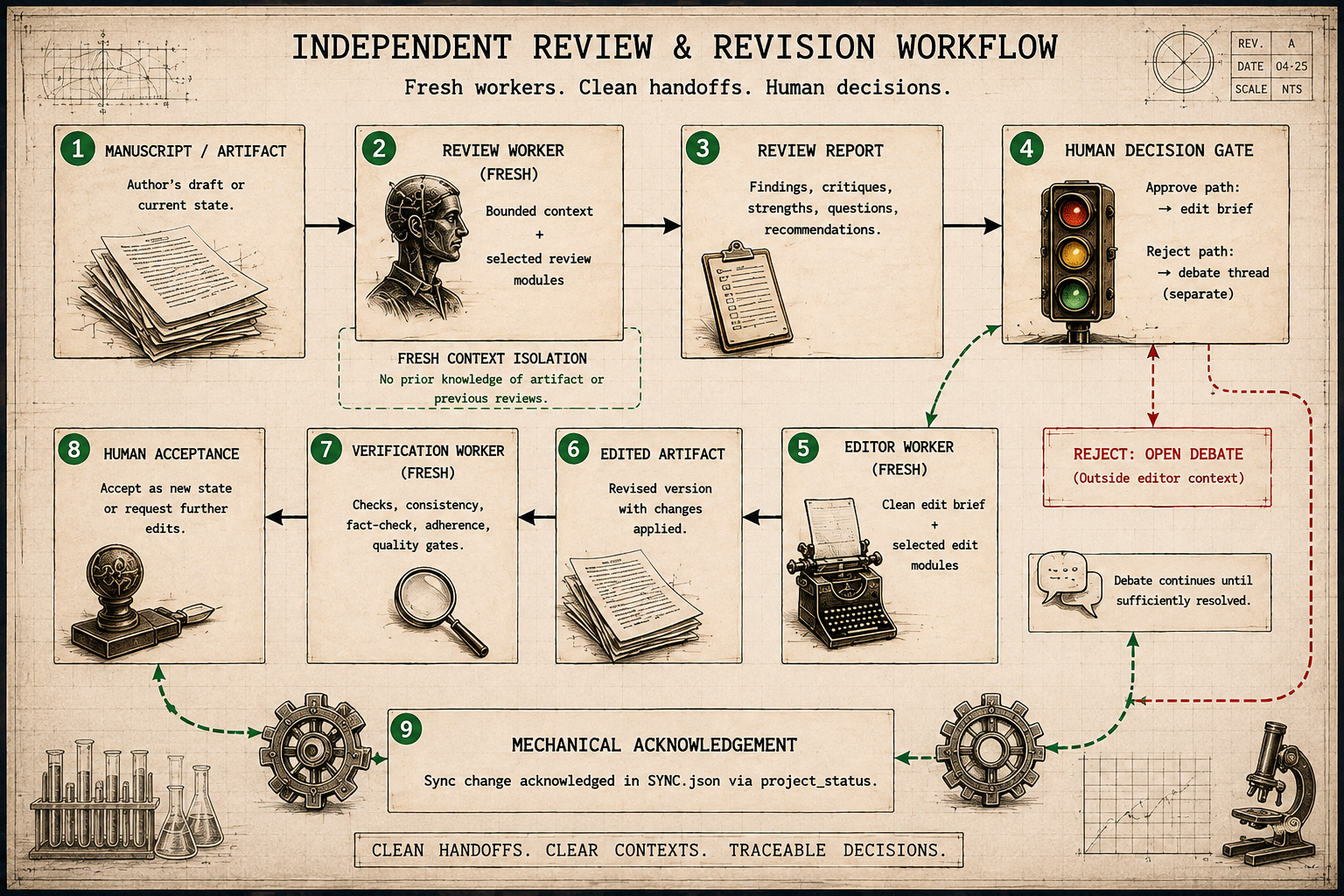
In the diagram, “fresh context” means no prior supervisor transcript or review debate. The worker still receives the selected artifact, context files, and task brief needed for its assigned job. Existing configured agents and style conventions are also included. Keep those files free of task-specific review debate when independent context matters.
What problem this addresses
A long conversation can accumulate rejected alternatives, reviewer arguments, author responses, and intermediate formulations. Passing all of that history to the model performing the revision can contaminate the final prose.
For example, suppose an earlier draft said X. A reviewer recommends Y, and the author agrees. A writer exposed to the whole debate may produce “Not X, but Y.”
A fresh edit worker given only the accepted correction can instead produce the clean statement “Y.”
The same problem appears in subtler forms: “in this version”, “we now”, “as requested”, a denial of a claim no standalone reader would infer, or reviewer-response language copied into the manuscript. These phrases are not inherently wrong. They become a problem when their only purpose is to answer historical context the manuscript reader cannot see.
The purpose is not to conceal relevant evidence. It is to distinguish the context needed to write the artifact from the historical discussion used to decide what should change. A response-to-reviewers letter or revision memo is different: reviewer, version, and change language may be exactly what that genre requires.
Review lenses
Pi Sych’s review skill supports different critical
postures without requiring different persistent reviewer agents.
A collaborative review behaves like a demanding co-author. It tries to recover the intended contribution charitably, then identifies the few changes that would most improve structure, clarity, coherence, economy, and evidential fit. It does not preserve an author’s preferred argument when the argument is substantively weak, but it does not redesign a sound manuscript merely because another structure is possible.
An adversarial review behaves like a skeptical referee. It requires the manuscript to earn its contribution and conclusions, actively tests alternative explanations and limitations, and looks for overclaiming, missing reasoning, and structural weaknesses. Adversarial does not mean contrarian: a strong manuscript may legitimately receive few findings.
A reader-friction/context-leakage lens asks whether the finished artifact makes sense to a reader who never saw the prompt, earlier draft, review exchange, or agent conversation. It flags process residue, unexplained version language, unmotivated denials or contrasts, over-signposting, generic model polish, and other rhetoric that jars with the surrounding voice or is motivated only by hidden process history. It does not ban constructions simply because generated prose often uses them.
For substantial prose, these lenses treat structure, clarity, repetition, argument coherence, voice coherence, and artifact self-containment as first-class review targets. Structural review may use a reverse outline before sentence polishing when the sequence is unclear. Repetition includes duplicated rhetorical jobs and repeated implications even when the wording differs.
When accepted project state is available, review also compares the
artifact’s apparent objective, contribution, scope, and major claims
with PROJECT.md, DECISIONS.md, or equivalent
accepted files. A material disagreement is a finding to surface, not
permission to choose one representation silently. The user may confirm
the new direction, update durable state, or revise the artifact.
For high-value work, separate clean-context passes can apply different lenses to the same artifact. Keep their findings independent until synthesis. Agreement increases confidence; disagreement identifies a question to inspect rather than a result to average away. Using different model roles can add diversity, but lens diversity does not require different models.
A typical manuscript cycle
1. Write or update the manuscript
The manuscript and supporting project files remain ordinary files in
the project. PROJECT.md records the project direction,
while SYNC.json can track relevant artifacts and declared
dependencies.
For substantial drafting or revision, structure comes before wording. A topic-sentence outline can expose an unclear new argument; a reverse outline can expose duplication, missing moves, and badly sequenced paragraphs in an existing draft. Copyediting should wait until the location and job of the prose are reasonably stable.
A standalone manuscript should normally state its claims directly for the manuscript reader. Revision history, reviewer requests, earlier prompts, and previous-draft comparisons belong only when they have an independent scholarly purpose. Legitimate history, such as a material protocol amendment that the methods must report, should remain.
2. Request an independent review
The supervisor checks mechanical project state and creates a bounded worker packet containing the review task, expected output, selected context files, relevant skills, model role, capability mode, and timeout.
The reviewer receives no supervisor transcript. It sees the context and tools selected for that review. The task can request a collaborative, adversarial, structural, evidential, detail, copyediting, or reader-friction/context-leakage focus. Use the smallest review recipe that covers the question rather than loading every review concern into every pass.
3. Decide what to do with the findings
The reviewer returns findings rather than silently changing the manuscript. You may accept, reject, prioritize, combine, or ask for clarification on each material point.
You can respond in the conversation, annotate the last assistant message, or annotate a project-local review file.
Feedback authority and review scope
A review’s delivery channel is not its authority. Author-authored Plannotator annotations are direct author feedback, not independent LLM review. Co-author comments have a strong presumption of integration, subject to discussion when there is a substantial objection. Human peer-review feedback deserves a serious response: integrate it where warranted or give a reasoned rebuttal. Independent LLM reviews are advisory, especially when instructed to find flaws. A demonstrated factual or methodological error still matters regardless of its source.
Before editing, compare LLM findings with PROJECT.md,
accepted decisions, evidence, and the intended contribution. Triage
material errors separately from stylistic alternatives, speculative
objections, and obvious limitations. An adversarial model can keep
generating objections; exhausting them is not a completion criterion.
Avoid accumulating caveats that bury a defensible thesis.
Reviews returned by a worker or invoked through a packaged prompt end with a brief LLM review line naming the requested lens and how that task may shape which findings stand out. For example:
LLM review · Adversarial: I was asked to prioritize flaws, so some points may be less relevant than others.
Prefer this useful cue about the review’s likely selection bias over a list of checks not performed or a generic AI disclaimer. Collaborative reviews can note that prioritizing constructive improvement may miss flaws needing a more adversarial pass; tailor other lenses similarly. Ordinary supervisor reviews need not carry the line unless requested or useful. Do not add an LLM-review line to human-authored comments.
4. Launch a fresh edit worker
The supervisor converts your decisions into a clean implementation brief. The edit worker receives:
- the accepted corrections;
- the manuscript or sections that must change;
- applicable evidence and style requirements;
- any tools needed to perform the revision.
It normally does not need rejected suggestions or the full review debate.
For example: “Prepare a clean edit brief from only the corrections I explicitly accepted. Include the source files, evidence, constraints, and acceptance checks needed to implement them. Identify unresolved decisions. Show me the brief before dispatching; do not edit or acknowledge files yet.”
When revising human-authored prose, the edit worker should default to minimum intervention. Clear, accurate, audience-appropriate prose that fits the intended voice does not need rewriting merely because the model can phrase it differently. New drafting should instead follow the strongest available project or author style evidence without copying phrases from examples. Before finalizing a standalone artifact, the worker should also remove revision-process residue that has no reader-visible purpose.
5. Verify in another fresh context
A verification worker receives the revised files and the original criteria. It checks whether the accepted changes were implemented, whether anything was lost or distorted, and whether the revision introduced new problems.
A failed verification leads to a new edit worker with a focused correction packet. The previous worker context is not resumed.
6. Accept and acknowledge
Human acceptance remains separate from mechanical acknowledgement.
project_status rehashes selected files immediately before
updating SYNC.json; acknowledgement aborts if a reviewed
file changed during that interval.
Selecting tools
Workers receive the mode and optional integrations appropriate to their task:
read-onlyexposes reading and discovery tools for review, inspection, and analysis;editadds focused file editing and writing tools;full-hostexposes Bash for tasks that must run project commands or inspect the wider host environment; andremoteResearch: trueloads native Pi MCP and codemode for an explicitly assigned remote-research task. A worker does not inherit a supervisor’s companionwebtool.
These names describe visible Pi tools, not security boundaries. Tool modes do not remove the worker process’s underlying host permissions.
Human review tools
/plannotator-lastannotates the last assistant response and returns feedback to the conversation./plannotator-annotate <file>accepts only a project-local.mdor.mdxfile and writes feedback to<file>.feedback.md./plannotator-reviewrecords code-review feedback in<projectRoot>/PLANNOTATOR_REVIEW.md.
These are review interfaces, not a plan controller or automatic
approval system. Plannotator is a separate optional extension: disable
it with pi config or package extension filtering without
changing the core review workflow. See the public contract for the supported
boundary.
What isolation does and does not guarantee
Each worker in this recommended pattern is a new process using the default clean mode, with an explicit context packet and no supervisor transcript. Fresh processes make it possible to keep the accepted edit brief separate from the preceding review debate.
The supervisor still chooses the files, skills, tools, integrations,
and instructions included in each packet. --tools and
--exclude-tools can narrow visible tools for a Pi session,
but do not sandbox a worker. Context discipline therefore remains partly
a workflow responsibility. It is context isolation, not a host sandbox.
It does not guarantee that selected files are free of review history,
that remote results are correct, or that host access is contained.